Revamping Info-Tech’s Website: New IT Security Services Pages

Since 2000, Info-Tech Montreal has been making IT simple and reliable for small and medium-sized businesses like yours. As a specialized Montreal IT company, we know how important it is for you to focus on running your business without having to worry about computer networks, servers, hardware, cybersecurity and more.

To help you get to know Info-Tech and our services a little better, we’ve recently revamped our website. I invite you to discover our improved website and to contact us for more information on our services.

A detailed-oriented revamp

These days, companies of all sizes need to ensure the reliability, efficiency, and security of their IT systems. But how can you, as an entrepreneur, navigate a world where technology is constantly evolving and potential risks multiplying?

We felt providing you with more detailed information about our IT services, including our IT security services, could help you make an informed decision about your IT supplier choice.

The new pages on our website now give you all the information you need to understand our comprehensive list of services. With the help of one of our Virtual CIOs (chief information officer) and an assessment of your IT needs, you can choose the services that will keep your business running smoothly.

We understand that running a business involves countless responsibilities and challenges. Our goal with this website revamp is to make information and support more accessible to all our new and existing clients. We are committed to providing top-notch services that help you focus on what you do best – running your business. – James Hutchinson, VCIO at Info-Tech Montreal

New IT security services pages

IT security is important to all IT systems and networks, and companies can’t afford to ignore it. Neglecting IT security could result in serious problems, including downtime, data loss, breaches of confidential information, and more. Our new IT Security service pages are designed to be easy to navigate and understand. They give you a clear picture of how we can help you protect your business from threats.

Our key services to improve IT Security in Montreal include:

  • Cybersecurity: Our cybersecurity services are here to protect your digital assets and data from threats. We offer threat detection and prevention, firewall management, and intrusion detection to keep your business safe from cyberattacks. 
  • Remote Monitoring and Management: We provide 24/7 remote monitoring to keep an eye on your IT systems. This means we can detect and fix issues quickly, often before you even know there’s a problem. 
  • Business Continuity & Disaster Recovery: Planning for the unexpected is crucial. Our business continuity and disaster recovery services help you prepare for and recover from unexpected events. 

Other essential IT services

Info-Tech Montreal does more than ensure the security of your IT systems; we offer a complete range of IT services in Montreal to support your business needs.

  • IT Consulting: Our IT consulting services in Montreal help you make smart decisions about your technology. Whether you need advice on upgrading your systems, implementing new software, or optimizing your current setup, we’re here to guide you.
  • Managed IT Services: Our managed IT services include helpdesk support, system maintenance, and network management. We ensure everything runs smoothly and securely.
  • Server Management: We keep your servers running at their best. From setup and configuration to monitoring and maintenance, we make sure your servers are secure and performing well.
  • Cloud Solutions: Take advantage of the cloud with our services. We help you move your data and applications to the cloud, manage your cloud environment, and ensure it is secure.

How does this benefit our clients?

With its new IT security section and detailed IT service pages, our website now offers a comprehensive overview of all the services we offer to help you protect and grow your business. We give you peace of mind by offering full IT support tailored to your needs, from IT consulting to managed IT services and cloud solutions.

I invite you to explore our website to discover how Info-Tech, a Montreal IT company, can help protect and grow your business. Our goal is to provide the tools and support you need to keep your business safe and efficient in today’s digital world. For further information, please contact us at info@infotechmontreal.com or call (514) 634-4636 x 101.


Weathering the Storm: 7 Steps to Safeguard Your Business Technology & Data

An imminent extreme weather event poses a concerning problem for all types of businesses. This is especially true for companies that rely on computers and servers since these devices can easily be damaged by storms, floods, or fires. As extreme weather approaches, the 24 hours prior to its arrival are crucial. Business owners need to act fast to protect their expensive equipment and valuable data, making sure the business can still operate normally after the storm passes.

The Importance of Electronic Equipment

Electronics and data storage devices, such as computers and servers, are crucial to businesses. When snow storms or floods occur, these devices can easily be damaged by water and suffer power issues. When your computer breaks down, not only is it expensive to fix or replace it, but you may also lose all of the information you had stored on it. The importance and volume of data that can be lost is a major concern. Therefore, protecting these devices from storms is a top priority.

A List to Prepare Your Business the Day Before the Disaster

If you’re a business owner in Quebec or Ontario, you likely know about the extreme weather season.

Severe weather not only impacts the location where it occurs, but other areas as well. A technical issue in Montreal due to a snowstorm, for instance, can easily disrupt operations in your Toronto or Vancouver office. Hence, safeguarding your technology and data against adverse weather is crucial.

This useful 7-step list will help you get ready for the extreme weather season. Even if you’re not located in a storm-prone area, it’s wise to be prepared. If a storm creates a technical issue that affects your offices, you need to ensure that it does not harm your business.

Protect Your Premises

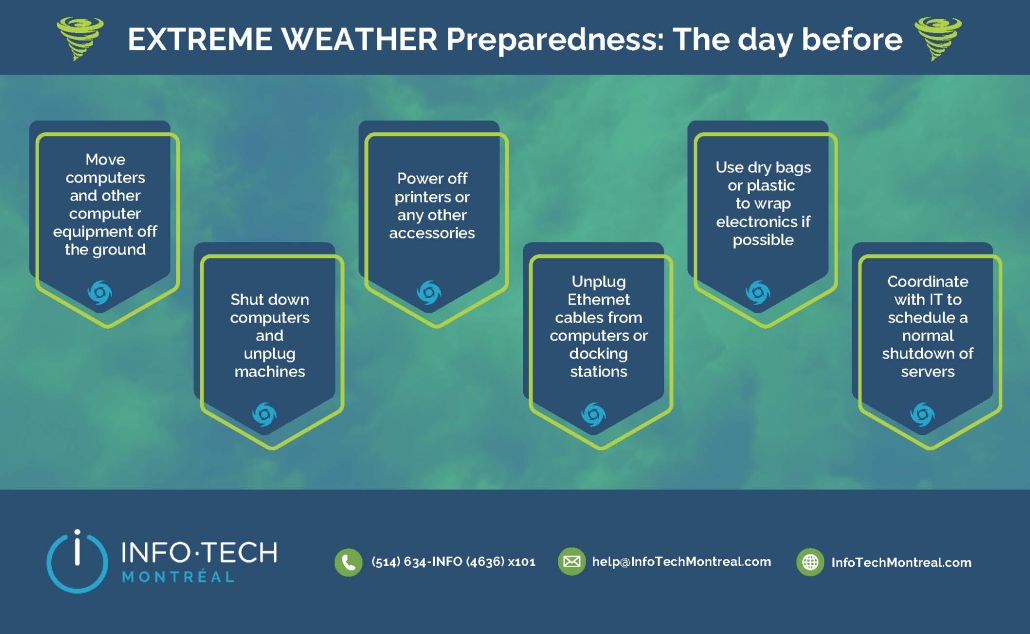
It may seem obvious, but office spaces require storm readiness. Just as you’d prepare your home to resist a storm, so too must you follow the same guidelines for your business premises. If possible, shut down and disconnect everything on the day before the storm hits.

Protect Your Tech Devices From Water

Everyone understands that water and technology are enemies. Water damage can not only destroy your business’s tech, but also pose a fire hazard due to the possibility of electrical shorts. If you’re in a flood-prone zone, it’s wise to elevate your electronics – place them on desks, tables, or high shelves. Ensure all devices are connected to surge protectors or, better yet, are disconnected entirely before vacating.

Document Your Assets

As you get your tech ready, snap photos and list all your electronic devices and high-value items. If a disaster strikes, having this inventory simplifies the insurance claim process.

Ensure Your Essential Business and Client Information is Saved Securely

At Info-Tech Montreal, we’ve helped many businesses with disaster recovery. We therefore emphasize the importance of data backups. Consider your business suffering a power outage. If you’re forced to operate from a different location, which documents and software would be crucial for remote operations?

This is when remote monitoring and management tools become invaluable. Your IT service partner can assist in setting up offsite data backups, save your information on the cloud, and guarantee remote access to all necessary resources to keep your business running. Contact us and ask us about getting this set-up ASAP.

Establish a Disaster Recovery Strategy

You’ve safeguarded your data, meticulously checked your tech, and even photographed your office, including those unique knick-knacks for insurance purposes, but are you prepared for the aftermath of storm or flood damage? It’s vital to devise a detailed recovery blueprint, specifying roles, contacts, locations, and storage points for crucial items. If partnered with an IT managed service provider like Info-Tech Montreal, your IT crew can offer invaluable assistance with this type of planning.

Make an Offline Contact List

Weather disasters and their aftermath can disrupt power and access to the internet, making communication a challenge. While safeguarding your data, consider creating a list of vital contacts, including staff, clients, and suppliers. Save this on your phone or have a printed copy handy. That way, if you’re offline, you still have quick access to all necessary contacts, ensuring uninterrupted communication.

Run Drills for Weather Disasters Regularly

It’s often said that practice makes perfect. In high-pressure situations, recalling a months-old plan can be tough. On the other hand, following a drill you and your team have consistently practiced is simpler. Even if your location isn’t typically affected by storms or floods, having an extreme weather protocol is essential. Ensure that both you and your staff are well-versed in emergency procedures.

Preparing Your Business for Extreme Weather Disasters with Info-Tech Montreal

With the right preparations, safeguarding your business against extreme weather events and seasonal risks becomes manageable. At Info-Tech Montreal, we offer services like remote IT managed services, and tech consultancy to prepare your business against unforeseen calamities. Regardless of where you’re located within the Montreal and Ottawa areas, or what type of business you have, we remain ready to assist.

What Are The Benefits of Managed IT Services?

A managed service is any task that a third party is engaged in, primarily in the area of enterprise managed IT services. Managed services enable you to delegate general tasks to an expert to reduce costs, improve quality of service, or free up time for internal teams to perform business-specific tasks. Companies that offer these types of services are called managed service providers (MSPs).

The increasing trend of remote work and the surge in demand for IT services have propelled the industry into high demand. Employers are striving to adapt to more flexible work arrangements, leading to a growing IT services market value estimated at around $32 billion in Canada in 2025. Businesses of all scales are embracing related services, highlighting the indispensability of IT services in this landscape.

While the advantages of IT project management services may not be immediately obvious, we wanted to highlight the ones that make IT outsourcing a valuable investment. Let’s explore some of these benefits.

Benefits of Managed IT Services

Going to a trusted IT provider gives you additional benefits, such as:

1 – Avoid Sunk & Operational Costs

Managing an internal team means you have significant sunk costs, such as monthly salaries, benefits, insurance, and office maintenance. In addition, training staff to familiarize themselves with your existing systems and processes, takes time and money. By outsourcing your IT initiatives to professionals, you reduce the significant capital costs of managing systems in-house, and add little or no value to your business. In addition to reducing your capital expenditures, managed IT services also help reduce your IT costs. For example, Managed Services helps you save on:

  • Consultation
  • Licensing
  • Training
  • Emergency repairs.

You also benefit from lower labor rates when you sign the Managed Service Level Agreement, which also saves you time.

2 – Faster Response Time

In today’s business world, downtime and technical difficulties need to be mitigated, to fully leverage the employees of any given organization. Particularly during busy periods, on-demand support is required to keep your team productive. With a support provider at your side, in the case of an emergency, help is available to your users, day or night, during weekends and even on holidays.

3 – Expertise & Experience

The key benefits of selecting the right managed IT services, include having access to a team that has the qualifications, training, certifications, and experience, specific to your industry. A managed service provider gives you access to first-rate IT administrators with specific skills, so you don’t have to find and hire them yourself. In partnership with an IT support company, your business also has access to the latest technologies on the market, which can be implemented quickly and smoothly.

4 – Proactive Monitoring & Problem Resolution

In addition to accessing experts in this field that you would otherwise be unable to afford in-house, you also benefit from proactive solutions, which are preventative in terms of mitigating risks and any possible data infringement or loss, when working with managed services providers. Monitoring and managing your IT helps detect problems, before they get worse.

Managed IT not only delivers a rapid response, but also ensures business continuity with minimal downtime.

5- Data Compliance Support

Many organizations are required to meet strict standards and requirements for integration with their IT initiatives.

These standards set out specific rules for privacy, financial services, retail establishments, and health care reporting and security, with which managed providers are familiar.

6 – Cybersecurity Support

Outsourcing to a managed service provider well-versed in cybersecurity and compliance can significantly mitigate the risks associated with credit card usage, customer data protection, and potential leaks of sensitive information.  Managed Service Providers are adept at implementing robust security policies that guarantee your organization aligns with stringent security standards, positioning it as a low-risk entity. By entrusting their compliance needs to experts, businesses can focus on their core operations while having peace of mind knowing that their data and customers’ information are safeguarded against cyber threats and vulnerabilities. Partnering with a managed service provider not only enhances the security of your data but also ensures regulatory adherence and fosters trust among your customers.

7 – Single Point of Contact With Sellers

Maintaining a client list for each piece of IT equipment is a daunting challenge for many organizations. Fortunately, managed service providers handle hardware and software vendors, so you don’t have to go through complicated technical conversations, and can get the best price for equipment, through wholesale purchasing power.

  • Support your infrastructure with our comprehensive managed services
  • Assist users and remote sites, with our on-site support
  • Your end users’ devices will be safe and secure, with our managed desktop solutions
  • 24/7 monitoring of your environment will be provided with our server management solution

8 – Reduce Time to Market

IT management that incorporates cloud computing technology can revolutionize the way businesses operate by providing high-speed resources that eliminate IT inefficiencies. By leveraging cloud computing services, organizations can streamline their operations, increase productivity, and reduce time to market for products and services.

One of the key benefits of cloud computing in IT management is its scalability. Businesses can easily scale up or down their IT resources based on demand without having to invest in expensive hardware infrastructure. This flexibility allows companies like yours to adapt quickly to changing business requirements and ensures optimal resource utilization.

9 – Mitigate Risk

Every commercial investment carries some degree of risk. Here are some of the things you have to deal with:

  • Financial conditions
  • The evolution of technologies
  • Government regulation and changing market conditions

Outsourcing your IT helps mitigate typical business risks. You’ll be dealing with a lot of experts who know the ins and outs of the entire industry; they will make sure that your organization meets all the security standards, as well as security and compliance issues.

Conclusion

Although you may be tempted to manage all the technical work in your company yourself, it is not always the best use of your time or that of your employees. You only have a short window throughout the day to get things done, so you need to liberate as much time as possible to focus on your most important tasks. The benefits of managed IT services will help you accomplish this, while providing an IT infrastructure that meets your business needs.

With over two decades of experience, Info-Tech Montreal is well-equipped to help you achieve your goals by providing a wide range of services, including IT consulting, cybersecurity solutions, cloud computing services, and more. Whether you are looking to streamline your business operations, enhance efficiency, improve security measures, or scale your IT infrastructure, our expertise and resources support you every step of the way. Here are 5 reasons your business needs an MSP like Info-Tech Montreal.

Protect Your Business from a Data Breach With These 5 Tips

If you think the risk of a data breach or cyberattack is low, think again. According to the 2019 Data Breach Investigations Report by Verizon, every industry is at risk: last year, attacks were present from manufacturing to retail and from healthcare to administration, and everything in between. To safeguard your company from data breaches, it’s crucial to understand that not all attacks are from external sources – some are internal, and of course sometimes viruses get through accidentally due to employee mistakes.

No matter your industry, you have a lot to lose: your data, customer base, industry secrets, and proprietary information are all targets for attacks. As a cybersecurity expert in Montreal with 25 years of experience, I’ve put together five easy tips you can implement right away to help protect your business from a data breach.

  1. Implement an Employee Policy for Safe Use (anchor links)
  2. Remote Monitoring and Management Agents
  3. Install Proper Anti-Virus and Anti-Malware Software
  4. Have a Proper Off-Site or Cloud Back-up of All Data
  5. Install a Backup & Disaster Recovery Device

1. Implement an Employee Policy for Safe Use

Many businesses do not have any type of policy in place that sets boundaries for what employees can and cannot do on the internet and in e-mail accounts. To shield your organization from data breaches, your company should create a formal policy which all employees (current and future) need to sign which details information like e-mail best practices, rules for internet browsing, accessing social media sites, and completing personal tasks (like banking) on company time.

2. Remote Monitoring and Management Agents

Having managed IT services, such as Remote Monitoring and Management (RMM) on every computer and server allows your business to be in a proactive rather than reactive position with security threats. Acting as a safeguard against potential data breaches, the RMM can automatically advise your IT support team that there is an imminent disk failure, low disk space, overutilization, and more to ensure it is fixed before you face an IT emergency that prevents your staff from getting work done. Depending on your anti-virus software, RMM can also alert your off-site tech experts when malware is present. Which leads us to…

3. Install Proper Anti-Virus and Anti-Malware Software

When you have a team of IT experts monitoring your network security, a proper business class anti-virus solution will have the ability to alert a central web portal when a virus or malware is present. This is a critical step in protecting your business from data breaches. Because we are monitoring that portal, we’ll be able to tell when a machine has any kind of problem before you or your employees notice. We can then push commands to that computer system to clean it of the virus, and update the anti-virus software if needed. In the case that a virus can’t be cleared through a command sent via the portal, we’ll be able to notify you and your employee, connect manually, and remove it that way.

4. Have a Proper off-site or Cloud Back-up of all Data

At the absolute minimum, your business should have a cloud backup that can safely copy your data for you at regular, frequent intervals. This backup strategy is essential to protect your business from the consequences of a data breach. This way, you have access to a backup in case of a ransomware attack, hardware failure, computer damage, or theft.

5. Install a Backup & Disaster Recovery Device

Hands down, the best thing you can do to make sure your business is protected in the event of any kind of attack or damage, is to install a Backup & Disaster Recovery (BDR) device with a cloud backup component. This comprehensive approach will significantly enhance your ability to protect your business from data breaches. If you have onsite servers, this is especially important. In fact, in our opinion here at Info-Tech Montreal, it’s crucial.

Protect Your Business From a Data Breach Today

Don’t wait for a data breach to strike. Protect your business today! Contact Info-Tech Montreal now for a free security assessment and learn how we can safeguard your valuable data and take the first step towards robust IT security & cybersecurity.

Basic Security: Protect Yourself

Some steps you can take to protect yourself, click below;

How to Organize Your Google Drive

“Over time, with some neglect and potential laziness, your Google Drive can accrue tons of files and become a mess to find anything. Here’s how to organize your Drive to find everything fast and make sure it stays in order.How to Increase Battery Life”

What to Do When Your Mac Won’t Shut Down

“Macs are like any other computer. Sometimes they won’t start up, and sometimes they won’t shut down. If your Mac is refusing to shut off, here’s how to shut it down anyway—and, hopefully, permanently fix the problem.”

What’s the Best Way to Backup Your Computer?

“Everyone loses data at some point in their lives. Your computer’s hard drive could fail tomorrow, ransomware could hold your files hostage, or a software bug could delete your important files. If you’re not regularly backing up your computer, you could lose those files forever.”

How to Create Desktop Shortcuts on Windows 10 the Easy Way

Windows 10 still lets you create desktop shortcuts to applications, files, folders, and even websites. Desktop icons may a little out of fashion, but they’re still useful.

How to Change the Screen Resolution in Windows 10

“Is your Windows 10 computer’s screen looking a bit wonky? Did you plug in a new monitor that isn’t working as intended? You might need to adjust your screen resolution. Here’s how.”

Call Now Button